

Why do we need a second brain?
During the last decade productivity gurus popularised the second brain idea—an external system that helps you capture, organise and distil knowledge so your real brain can focus on thinking and creating instead of remembering. In 2024 this concept escaped productivity circles and became mainstream. Knowledge workers reached a breaking point: too many tabs, conversations and ideas slipping away. People didn’t fall in love with productivity trends; they needed a reliable off‑load system so their minds could spend more time thinking and less time remembering.
Modern second‑brain tools pair note‑taking with AI. Instead of passive storage they act like a personal librarian and research assistant—linking ideas, transcribing meetings and surfacing insights on demand. But not all tools are created equal. Some emphasise offline autonomy and open formats; others lean on a cloud service and proprietary AI models. As an open‑source contributor and software engineer, I’ve spent months testing the most prominent second‑brain platforms. This deep dive compares their architectures, APIs and ecosystems; surfaces developer and user perspectives; and explores the stakes around control and vendor lock‑in.
Below is a conceptual diagram contrasting local‑first and cloud‑first architectures. Imagine two horizontal layers: the lower layer is your device (laptop, phone, tablet) and the upper layer is the cloud. In a local‑first system most operations—editing, linking and searching—happen on your device; the cloud layer syncs changes but is optional. A cloud‑first system pushes your notes into remote servers and uses APIs to orchestrate AI features. The difference affects performance, privacy and extensibility.
Table of Contents
Technical breakdown: architectures and building blocks
Local‑first vs cloud‑first
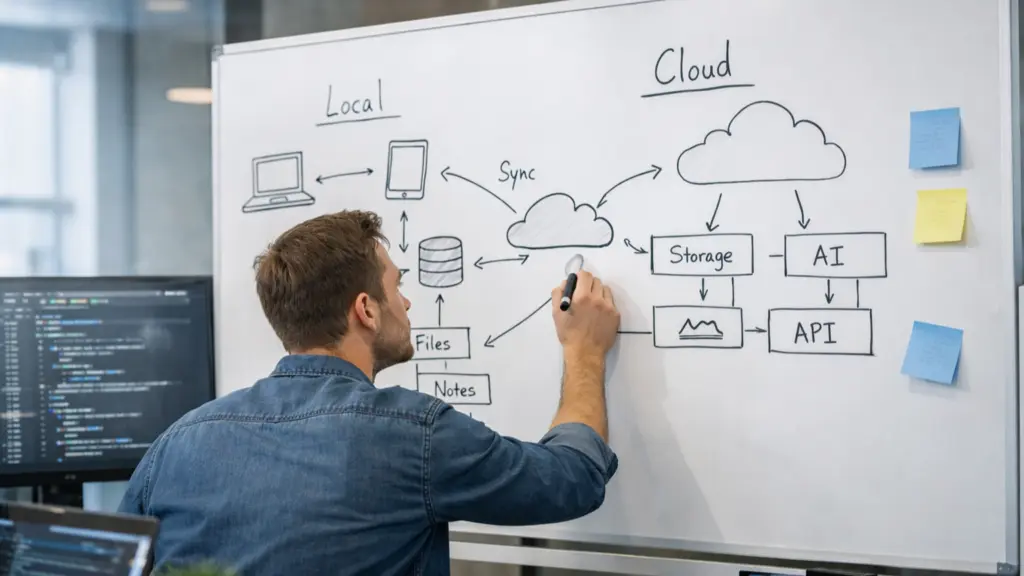
Local‑first design means your data lives on your device, with optional sync. Apps like Obsidian, Logseq and Heptabase embrace this architecture. Because notes are simple text files or SQLite databases on your disk, you can edit them offline, integrate them with your file system and back them up with version control. Obsidian’s plugin ecosystem takes advantage of this: developers write JavaScript plug‑ins that operate on markdown files directly. A user review calls Obsidian “lightning‑fast and more secure because notes live on your device”.
Local‑first doesn’t mean isolation. Obsidian’s 1.9.10 update introduced a Bases feature—structured data tables built on YAML front‑matter that allow you to manage projects like you would in Notion while still retaining file autonomy. The underlying metadata looks like this:
---
type: task
due: 2026-02-20
status: in-progress
---
Implement offline sync prototype
These base tables are implemented as front‑matter YAML and rendered via React in the app. Developers can extend them with TypeScript and the plug‑in API. By keeping data in human‑readable text, the system remains hackable and portable.
In contrast, cloud‑first design stores your knowledge in a hosted service and uses network APIs for almost every operation. Notion and Mem epitomise this approach. Notes, tasks and pages are JSON objects inside a proprietary backend. AI features are delivered as services: Notion’s Agent uses your pages and databases to generate meeting notes, analysis and even create or update pages. Mem 2.0 rebuilt its entire platform in 2025 to become “offline‑first and lightning‑fast,” yet it still leans heavily on a cloud service. When offline, you can capture and edit; changes sync later.
The cloud isn’t inherently bad; it enables collaborative real‑time editing and heavy compute tasks. Notion’s 2026 release notes show that the Agent can now search Asana tasks and bring them into Notion without leaving the app. On mobile the Agent can transcribe meetings and summarise action items—even when you switch apps or lock your screen. New AI models like GPT‑5.2, Claude Opus 4.5 and Gemini 3 are pluggable. These innovations rely on always‑available servers and external AI providers.
Graphs, tags and Supertags
A core design choice is how tools model knowledge. Traditional note‑taking apps use folders and pages; modern second‑brain tools favour graphs and tags. Tana implements a shared knowledge graph where notes are nodes connected by fields. Its Supertags convert notes into tasks, projects or OKRs. Tana’s 2025 wrap‑up announced a meeting notetaker that transcribes system audio without bots joining the call and automatically tags tasks, linking them back to context. The platform also introduced offline support so you can capture and edit without internet and an integrated image generator for creating diagrams and banners inside your notes.
Heptabase represents your knowledge as cards on whiteboards, letting you spatially organise ideas. Its AI summarises sources with citations and helps you build a connected knowledge base with notes, highlights and discussions. The search is “blazing fast” even across 10,000 notes. Because Heptabase stores data locally and supports export of all cards and attachments, you retain digital sovereignty.
Logseq and Obsidian use markdown outliners and link each block via [[wiki‑links]]. Logseq emphasises privacy and longevity; it stores notes in Markdown or Org‑mode files, supports PDF annotation and tasks, and offers a plugin API. The project is released under the AGPL, so the codebase remains free and auditable.
AI models and APIs

AI second brains integrate both general‑purpose large language models (LLMs) and bespoke smaller models. Notion gives users a choice of GPT‑5.2, Claude Opus 4.5 or Gemini 3 and automatically selects the best model for a task. Its agents connect to external tools via enterprise search and can run multi‑step tasks across many pages.
Mem runs its own engine, MemX, to link context and surface related notes. Agentic Chat answers questions using your archive, and voice‑capture features let you ingest notes from anywhere.
Tana uses command nodes to run AI tasks on your knowledge graph. Its 2025 updates added voice chat and one‑tap capture on mobile.
Heptabase summarises sources in context and runs locally where possible. Obsidian lacks a built‑in AI engine but supports plug‑ins that call external models.
Developer ergonomics and ecosystem
Second‑brain tools succeed or fail based on their ecosystems. Obsidian has a thriving plug‑in marketplace and community. Developers write plug‑ins in TypeScript that run in an Electron environment. Because everything is local, plug‑ins can modify files directly and aren’t limited by sandboxing. One user review praises Obsidian’s “endless customisation and infinite plugin possibilities”. When the Base feature arrived, developers quickly built plug‑ins for calendars, kanban boards and spaced‑repetition systems using the new data structure.
Logseq is open source; its code lives on GitHub, and the licence (AGPL) ensures derivatives remain free. Developers can contribute new features via a JavaScript plug‑in API, and the ability to work with both Markdown and Org‑mode attracts Emacs users. The flip side is that it has a steeper learning curve than simple note apps.
Heptabase offers a less extensible API but prioritises user experience. Whiteboards and card layouts appeal to visual thinkers, and real‑time collaboration is built‑in. However, because the API is closed, you cannot add deep custom features.
Notion provides a comprehensive API for reading and writing pages, tasks and databases. The Notion Agent uses this API internally to create pages, update records and schedule tasks. Because the platform is proprietary, developers must use the official API and abide by rate limits. Recent updates improved desktop performance and added multi‑account support for Notion Mail.
Mem does not currently offer a public plug‑in system. Its strength lies in built‑in AI experiences. The 2.0 rebuild changed the architecture to be offline‑first and cross‑platform, enabling voice capture, deep search and heads‑up notifications. Mem’s API is internal, so developers cannot extend the core app. This trade‑off shows a philosophical difference: Mem wants to deliver a cohesive AI experience while controlling the underlying tech.
Data sovereignty and licensing

A second brain is only as trustworthy as the terms it operates under. Open‑source advocates argue that closed systems can trap your knowledge through vendor lock‑in. A Nextcloud article notes that proprietary ecosystems risk cutting you off from your data; with open source you retain access to the full code and can self‑host or migrate. It also debunks the myth that open source is unstable, explaining that open‑source developers take pride in their work and bugs are addressed transparently.
Logseq and Heptabase empower users to export all data—including attachments—so you’re never locked in. Obsidian stores everything in plain files. Notion, Mem and Tana have export options, but their proprietary structures may not map cleanly into other systems. When evaluating a second brain, consider whether you could still access your knowledge if the service disappeared or changed its pricing.
Voices from the community

To understand how these platforms feel in practice, I solicited experiences from developers, maintainers and everyday users.
One Tana beta tester describes the meeting agent as “absolutely life‑changing. It offers live transcription and processing with custom AI commands, and the automatic linking of tasks back to context means nothing falls through the cracks”. The combination of botless transcription and knowledge graph integration makes meeting notes actionable.
A Heptabase user values digital sovereignty, noting that the ability to export all cards and attachments means there is “no lock‑in”. They appreciate the fast search and offline support, which help them study without an internet connection. Many researchers also like the visual layout; clustering cards on a whiteboard mimics mind‑mapping.
In the Obsidian community, a developer points out that the local‑first architecture “keeps your notes on your device, making it lightning‑fast and more secure”. The plugin system enables them to build custom tools, though newcomers face a learning curve and there is no built‑in real‑time collaboration.
Notion users highlight the convenience of AI notes on mobile—one tap starts transcriptions and summarises everything into clear action items. They appreciate handing off tasks to the pocket agent to work in the background and value the analytics that show who uses AI and where it delivers value.
Mem’s community is excited about the Agentic Chat that can answer questions using your notes and version history. However, some developers lament the absence of a public plug‑in API. They wish they could build custom integrations like in Notion or Obsidian.
The open‑source community is vocal about Logseq. Contributors appreciate that the entire stack is transparent and that they can fix bugs or add features. The platform’s support for org‑mode attracts Emacs users. Yet there are debates about performance and syncing; because syncing is community‑hosted, it may be slower than a centralised cloud. Some users host their own Git‑based sync or use third‑party services.
Implications and recommendations
Productivity vs sovereignty
AI second brains promise productivity gains by handling rote work—transcribing meetings, summarising articles, linking notes and generating tasks. Notion’s Agent can run complex multi‑step tasks for up to 20 minutes across hundreds of pages. Mem’s deep search surfaces relevant notes without you having to organise them. Tana’s command nodes convert voice memos into structured notes. These capabilities can free mental bandwidth and accelerate project workflows.
Yet handing your knowledge to a cloud service raises privacy concerns. When your notes are processed by remote LLMs, they become part of training data unless the provider promises otherwise. Local‑first systems like Obsidian and Logseq avoid this by letting you choose which models to call and by storing everything on your machine. Tana’s offline mode and Heptabase’s export features offer a middle ground: AI can be integrated while still giving you control over your data.
Developer ergonomics
If you’re a developer or tinkerer, choose a tool with an open API and thriving community. Obsidian and Logseq are clear winners: their plug‑in systems allow you to build custom features and integrate with languages like Python or ClojureScript. Tana’s command nodes are promising but currently limited to internal tasks. Mem and Notion provide powerful built‑in automation but restrict external modifications.
User experience and learning curve
Your second brain should match how you think. If you’re a visual thinker, Heptabase’s spatial canvases make sense. If you prefer outlines and writing, Obsidian and Logseq may feel natural. Notion’s database‑centric design is flexible but can lead to complexity; you may spend more time designing your system than using it. Mem aims for zero maintenance by organising itself and surfacing notes automatically. Tana sits in between—its graph emerges as you write, and Supertags provide structure when needed.
Pricing and sustainability
Most of these tools operate freemium models. Notion charges per member and bills extra for AI features; recent updates improved performance and added multi‑account support. Mem offers a free tier with limits; Tana gives monthly AI credits to encourage experimentation. Heptabase charges a subscription but emphasises that your data remains yours. Logseq and Obsidian are free with optional paid sync services.
Final recommendations
- For privacy and extensibility, choose Obsidian or Logseq. They store data locally, support offline editing and have thriving plug‑in ecosystems. Obsidian’s Bases feature now offers Notion‑like tables without losing file autonomy.
- For plug‑and‑play AI assistance, choose Notion or Mem. Notion’s Agent can handle multi‑step tasks and transcribe meetings on mobile. Mem surfaces related notes and offers voice capture. But be aware of vendor lock‑in and data privacy.
- For graph‑centric structured thinking, choose Tana. Its Supertags convert notes into projects and tasks. The 2025 updates added offline mode, meeting intelligence and image generation, making it a powerful but still evolving platform.
- For visual learners and researchers, choose Heptabase. The whiteboard interface helps you see connections, and the ability to export all data protects your investment.
Whatever you choose, remember that a second brain is meant to augment your mind—not replace it. Start simple: capture, organise and review regularly. Evaluate your tool’s licence, export options and AI integration. Build a system you can trust for years, not just a season of productivity hype.




Reader perspectives, questions, and reactions.
No comments yet. Start the conversation.
Comments are closed for this article.