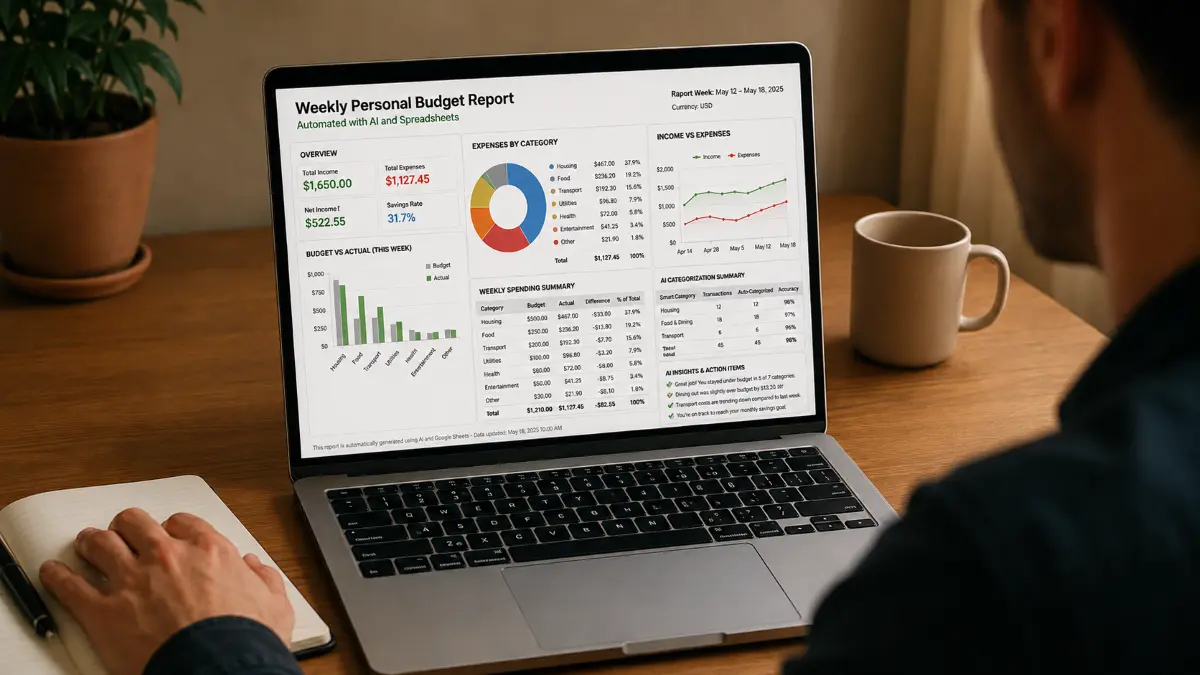

Automating your weekly personal budget reports can save time and improve financial awareness. By integrating AI with spreadsheet tools like Excel or Google Sheets, you can automatically categorize expenses and generate insightful summaries without manual effort. This approach works well for individuals managing their finances who want a clear, up-to-date view of spending patterns.
The AI assistant first asks a few questions to understand your expense categories, preferred spreadsheet platform, and how you want your reports formatted. It then uses transaction descriptions to categorize expenses automatically, reducing errors and manual sorting. Weekly summaries highlight total spending per category and provide quick insights, all displayed in a clean dashboard with charts and AI-generated notes.
This method works because it combines the power of AI’s natural language processing with the flexibility of spreadsheets. You can customize categories or add new ones as your financial habits change. For example, you might add a category for subscriptions or split dining expenses into groceries and restaurants.
With this system, your personal budget tracking becomes more efficient and insightful, helping you stay on top of your finances with minimal effort.
ROLE: AI assistant helping individuals manage personal finances
OBJECTIVE: Create an automated system for weekly personal budget tracking and reporting
CONTEXT: User wants to integrate AI with spreadsheets to categorize expenses and generate summaries automatically
REQUIREMENTS:
- Ask up to 3 concise follow-up questions about expense categories, preferred spreadsheet tool, and reporting format before generating the report
- Use AI to categorize expenses based on transaction descriptions
- Generate a weekly summary with totals and insights
- Provide formulas or scripts compatible with Excel or Google Sheets
OUTPUT FORMAT:
- Step-by-step instructions
- Sample spreadsheet formulas or script snippets
- Example of a dashboard layout with categorized charts and summary notes
QUALITY CHECK:
- Verify automation works with common spreadsheet tools
- Ensure expense categories are clear and customizable